
Code coverage as a part of CI/CD
This article is not about my day job. It comes from side projects, and from how far you can get once an idea is clear enough to build.
It started one autumn, when I built a few personal projects to try new libraries. For day-to-day work I use TDD. Unit tests are mandatory for me because they are easy to maintain and they cover the cases that matter most.
My GitHub workflow
I am a big fan of GitHub Actions. When the beta shipped, I moved everything from CircleCI to GitHub Actions.
Spend a few minutes on project setup
If you have worked on a legacy codebase, you already know this. Things get complicated even when we try to keep them simple. There are many ways to avoid that mess. The real question is how much time you can spend on setup.
When a new idea shows up, the last thing we want to think about is deployment or CI.
Keep a workflow you can copy
GitHub Actions are intuitive. The first time you open a workflow, you can change the commands and make them fit the project.
I keep a few workflows that I copy from project to project so the basics are in place, then I improve them as the project grows. That keeps the start simple and still leaves room for later.
Linting, formatting, and tests
This is the first workflow I add if a project does not have one. It improves daily development and the mood of the team.
Code style is one of the things other developers should not have to review by hand. Static analysis can be configured so style issues are caught before anyone else reads the change. That is not only about saving time. It also improves how the team talks: instead of arguing about indentation or unused variables, you can talk about performance. Style still matters. It should be decided once and then followed without much attention.
Here is a basic workflow you can copy into a project and adjust for the tools you use. This one is for a Node.js application that uses ESLint, Prettier, and npm. The commands need to exist in package.json.
name: CI

on: [push]

jobs:
  checks:
    runs-on: ubuntu-latest
    steps:
      - uses: actions/checkout@v2
      - name: Use Node.js 12.13.1
        uses: actions/setup-node@v1
        with:
          node-version: 12.13.1
      - name: Cache node modules
        uses: actions/cache@v1
        with:
          path: node_modules
          key: node_modules-v1-${{ hashFiles('package-lock.json') }}
          restore-keys: |
            node_modules-

      - name: Install dependencies
        run: npm ci

      - name: Run linting checks
        run: npm run lint

      - name: Run formatting checks
        run: npm run format-check

      - name: Run tests
        run: npm test
Code coverage
It was a normal evening. A colleague and I were working on a new Node.js service and ended up in code review.
I usually run git checkout {review_branch} before I review on GitHub, so I can check the tests, the coverage, and how the code is organized.
I do not like that process. Sometimes I have unfinished work in the working tree. Stashing changes and switching branches, only to check a coverage number, turns into a mess.
That is when I started looking for a way to get coverage feedback directly on GitHub. If we already use GitHub for everything else, we should be able to run a command and get a report on the current coverage.
Tool requirements
There are strong hosted tools for coverage reports, including Coveralls and Codecov.
I will not compare every cloud option here. Both are good if you want a third-party coverage service. I wanted something I could drop into the workflow I copy from project to project.
I wanted the review to stay inside GitHub, without opening another site.
- Built on GitHub Actions
- Shows how coverage changes with the incoming diff
- Points at uncovered lines
Those three things were what we wanted automated, without another third-party service.
Barecheck
There is no better way to spend an autumn evening than building something you will actually use. That is how a few Barecheck projects started.
barecheck/code-coverage-action is a GitHub Action that generates code coverage reports. I wanted to share it as part of the daily routine most of us already have.
The action reads an lcov report, parses the results, and posts a short summary as a comment.
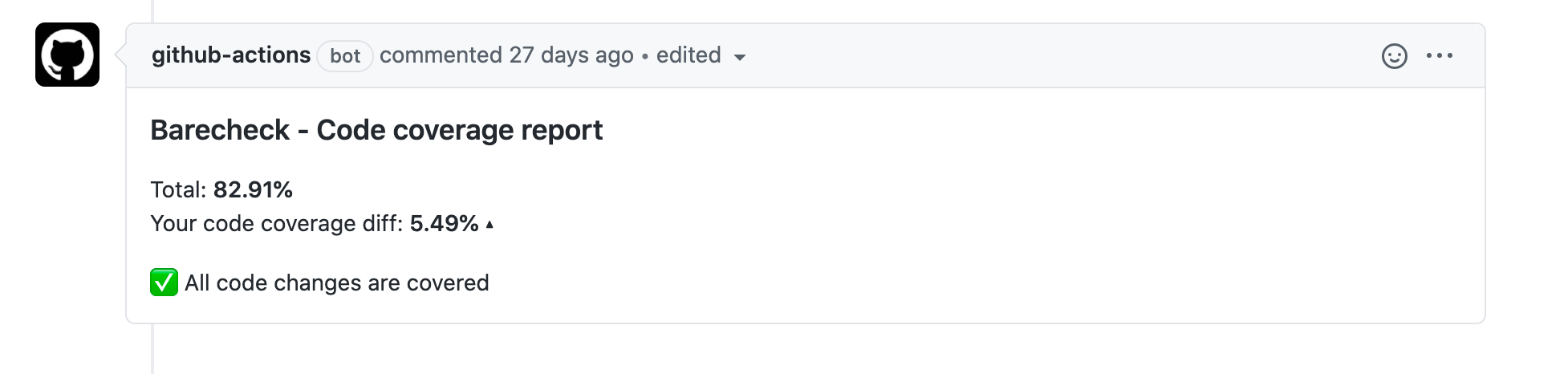
I used it for a few months before sharing it. It is on the GitHub Marketplace and can be added as its own workflow.
name: Code Coverage

on: [pull_request]

jobs:
  base_branch_cov:
    runs-on: ubuntu-latest
    steps:
      - uses: actions/checkout@v2
        with:
          ref: ${{ github.base_ref }}
      - name: Use Node.js 12.13.1
        uses: actions/setup-node@v1
        with:
          node-version: 12.13.1

      - name: Install dependencies
        run: npm ci

      - name: Run test coverage
        run: npm run coverage

      - name: Upload code coverage for ref branch
        uses: actions/upload-artifact@v2
        with:
          name: ref-lcov.info
          path: ./coverage/lcov.info

  checks:
    runs-on: ubuntu-latest
    needs: base_branch_cov
    steps:
      - uses: actions/checkout@v2
      - name: Use Node.js 12.13.1
        uses: actions/setup-node@v1
        with:
          node-version: 12.13.1

      - name: Download code coverage report from base branch
        uses: actions/download-artifact@v2
        with:
          name: ref-lcov.info

      - name: Install dependencies
        run: npm ci

      - name: Run test coverage
        run: npm run coverage

      # Compares two code coverage files and posts the report as a comment
      - name: Generate Code Coverage report
        id: code-coverage
        uses: barecheck/code-coverage-action@v0.2.0
        with:
          github-token: ${{ secrets.GITHUB_TOKEN }}
          lcov-file: './coverage/lcov.info'
          base-lcov-file: './lcov.info'
          minimum-ratio: 0 # Fails the GitHub Action if coverage decreases
          send-summary-comment: true
This example fails the job when coverage drops, so the pull request has to hold the line. The action compares changes, which means you can start on a project that already has low coverage and still push it upward.
I hope this makes the everyday review a little better, and that you give the action a try.