
AWS Preview Deployments with GitHub Actions
In this article, I will show you how to set up AWS preview deployments with GitHub Actions. Preview deployments are a great way to test your changes before they go live. They allow you to see how your changes will look in a production-like environment without affecting your live site.
Before you get started, you will need the following:
- An AWS account
- A GitHub repository with your code
- A basic understanding of GitHub Actions
- A basic understanding of AWS
- 30 minutes of your time to try it out
Why use preview deployments?
Preview deployments are a great way to test your changes before they go live. They allow you to see how your changes will look in a production-like environment without affecting your live site. This can help you catch bugs and issues early, and ensure that your changes work as expected before they are deployed to your live site.
I have been a big fan of Vercel and Netlify for a long time, both of them do a great job with preview deployments. But what if you want to use AWS for your preview deployments? If all your infrastructure is already on AWS, it makes sense to use AWS for your preview deployments as well to keep everything in one place. This would help you to keep your costs down and make it easier to manage your infrastructure.
How to deploy websites to AWS S3
We have used the S3 sync action for a while. It is simple and works well, but it does not support preview deployments on its own, so we add a small amount of setup around it. You can use the AWS CLI or another action for the upload. Any of them work once the infrastructure is in place.
AWS architecture for preview deployments
Before we start, let's take a look at the architecture we are going to use for our preview deployments. We are going to use the following AWS services:
- S3: to store our static files
- CloudFront: to serve our static files and provide SSL
- CloudFront functions: to add basic authentication to our preview deployments and redirects
- Route 53: to manage our DNS records
Here is what our architecture will look like:

To keep preview deployments fast, we use one CloudFront distribution and a CloudFront function that serves a specific folder from the S3 bucket.
Open source GitHub Action
I hope this could be helpful for a lot of people who are not looking to migrate from AWS and would like to have preview deployments as part of their developer experience workflow. I have created an open-source GitHub Action that you can use to deploy your websites to AWS S3 with preview deployments.
You can find the preview-deployment-action open-sourced on GitHub. Feel free to try it out and let me know if you have any feedback or suggestions.
How to use the action
To use the action, add the following workflow to your GitHub project:
name: Preview Deployment

on:
  pull_request:
    types:
      - opened
      - synchronize
      - reopened
      - closed

jobs:
  deploy:
    runs-on: ubuntu-latest
    steps:
      - name: Checkout
        id: checkout
        uses: actions/checkout@v4

      - name: Setup Node.js
        id: setup-node
        uses: actions/setup-node@v4

      #
      # YOUR APPLICATION BUILD STEPS ARE HERE
      #

      - name: Run deployment preview
        id: s3-preview-deployment-action
        uses: barecheck/preview-deployment-action@v1
        with:
          # The action should run after your static files are built
          build-dir: YOU_STATIC_FILES_OUT_DIR
          # App name will be used to create AWS resources.
          app-name: YOUR_APP_NAME
          # Preview deployments will add `preview-{PR-number}` as subdomain to this domain
          domain: YOUR_DOMAIN_NAME
        env:
          AWS_ACCESS_KEY_ID: ${{ secrets.AWS_ACCESS_KEY_ID }}
          AWS_SECRET_ACCESS_KEY: ${{ secrets.AWS_SECRET_ACCESS_KEY }}
          AWS_REGION: ${{ secrets.AWS_REGION }}
          AWS_ACCOUNT_ID: ${{ secrets.AWS_ACCOUNT_ID }}
          AWS_CLOUDFRONT_CERTIFICATE_ARN: ${{ secrets.AWS_CLOUDFRONT_CERTIFICATE_ARN }}
          GITHUB_TOKEN: ${{ secrets.GITHUB_TOKEN }}
- The pipeline will run on every Pull request and deploy the changes to the preview bucket.
- The preview bucket will be created automatically if it doesn't exist.
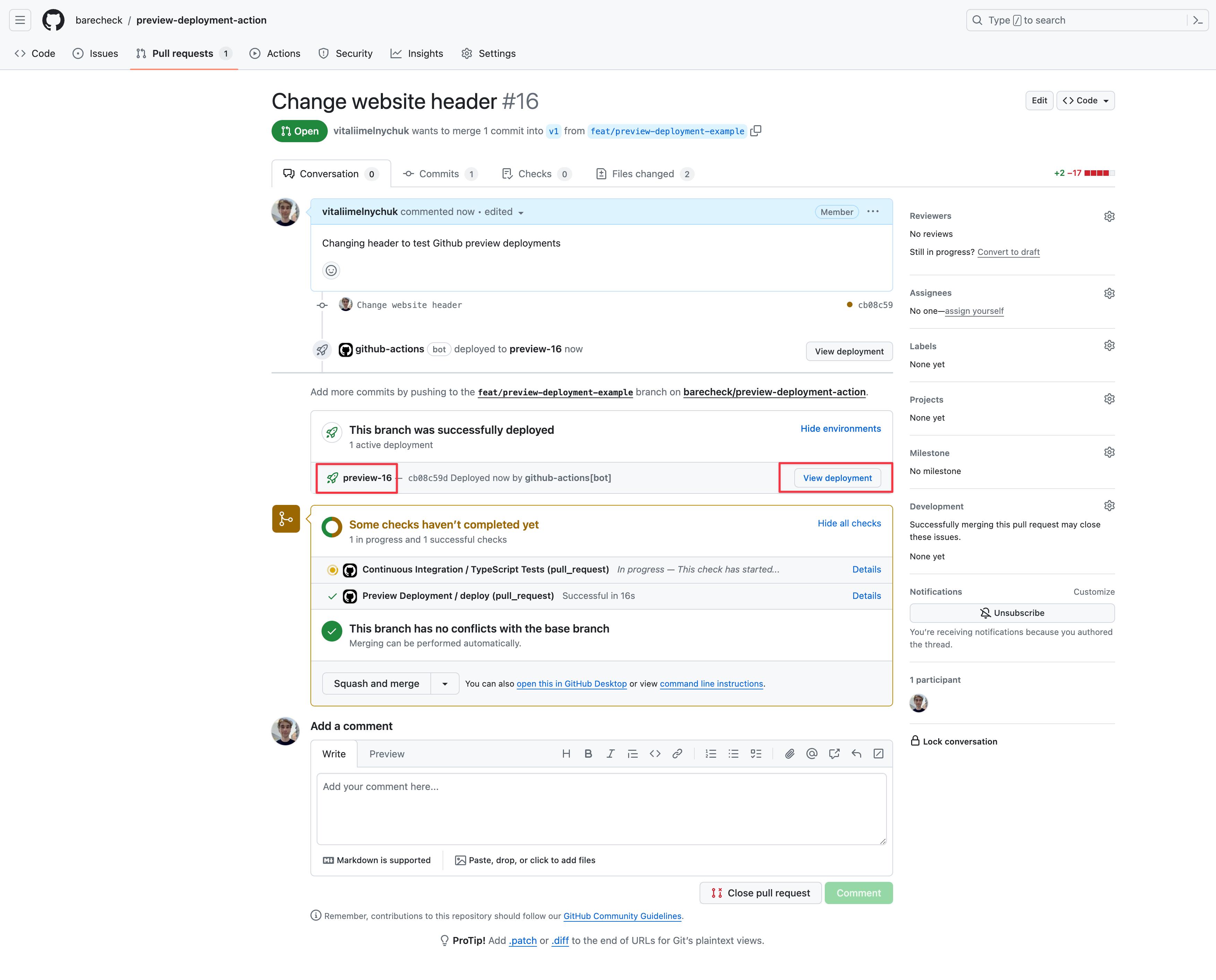
- The preview URL is added to the pull request as a GitHub deployment.
If everything goes well, here is the screenshot where you can find a link for preview deployment:
What's next?
I would be happy to hear if there is any interest from others to use this action. If you have any questions or need help setting it up, feel free to reach out on LinkedIn or open an issue on GitHub.
There are a few ideas that I already have in mind and planning to add shortly:
- Add support for protected preview deployments. Now, anyone with a link can access the preview deployment. I would like to add basic authentication or GitHub one to protect the preview deployments.
- GitHub comments with progress and more details about deployments. I think the GitHub environment is a great place to start but they are quite limited.
- Add Docker support. The action currently deploys static files to S3. Docker-based preview deployments would help projects that run small Python, Ruby, or Next.js apps.
I hope this article was helpful and you learned something new today. Thank you for reading!